Win more trades by cutting
what's losing you money
Trader OS is a Notion trading journal that does the maths for you. Log a trade and it works out your P&L, R-multiple and win rate, adds up exactly what each mistake has cost you, and shows your results when you followed your rules against when you didn't.
Why pay when free journals exist? A basic journal tells you what you traded. Trader OS tells you what your habits cost you, in money, so you know exactly what to stop doing on Monday.
- What's costing me: money lost to moved stops, revenge trades, chasing and FOMO, totalled for you
- Rules kept vs broken: your P&L both ways, so you can see what discipline is worth
- Risk calculator: the exact position size for the % you want to risk, and a warning when the reward isn't worth it
- Strategy playbook: win rate, average R and net P&L for every setup, so you keep the ones with an edge
- Weekly review: a 10-minute weekend routine with your numbers already filled in
From the example trades included in the template. Your own trades replace them.
Why Trader OS and not a free template
| Basic free journal | Trader OS | Journal apps | |
|---|---|---|---|
| Logs your trades | ✓ | ✓ | ✓ |
| P&L, R-multiple and win rate worked out for you | Sometimes | ✓ | ✓ |
| Money lost to each mistake, totalled | Usually not | ✓ | Some |
| P&L with rules kept vs broken | Usually not | ✓ | Some |
| Position-size risk calculator | Usually not | ✓ | Some |
| Imports trades from your broker | No | No (you log by hand) | Yes |
| Price | Free | £150 once | About $29–49 a month |
Logging by hand is a feature for most traders: writing the trade down is when you notice the mistake. If you need automatic broker imports, a subscription app is the better fit.
What it looks like
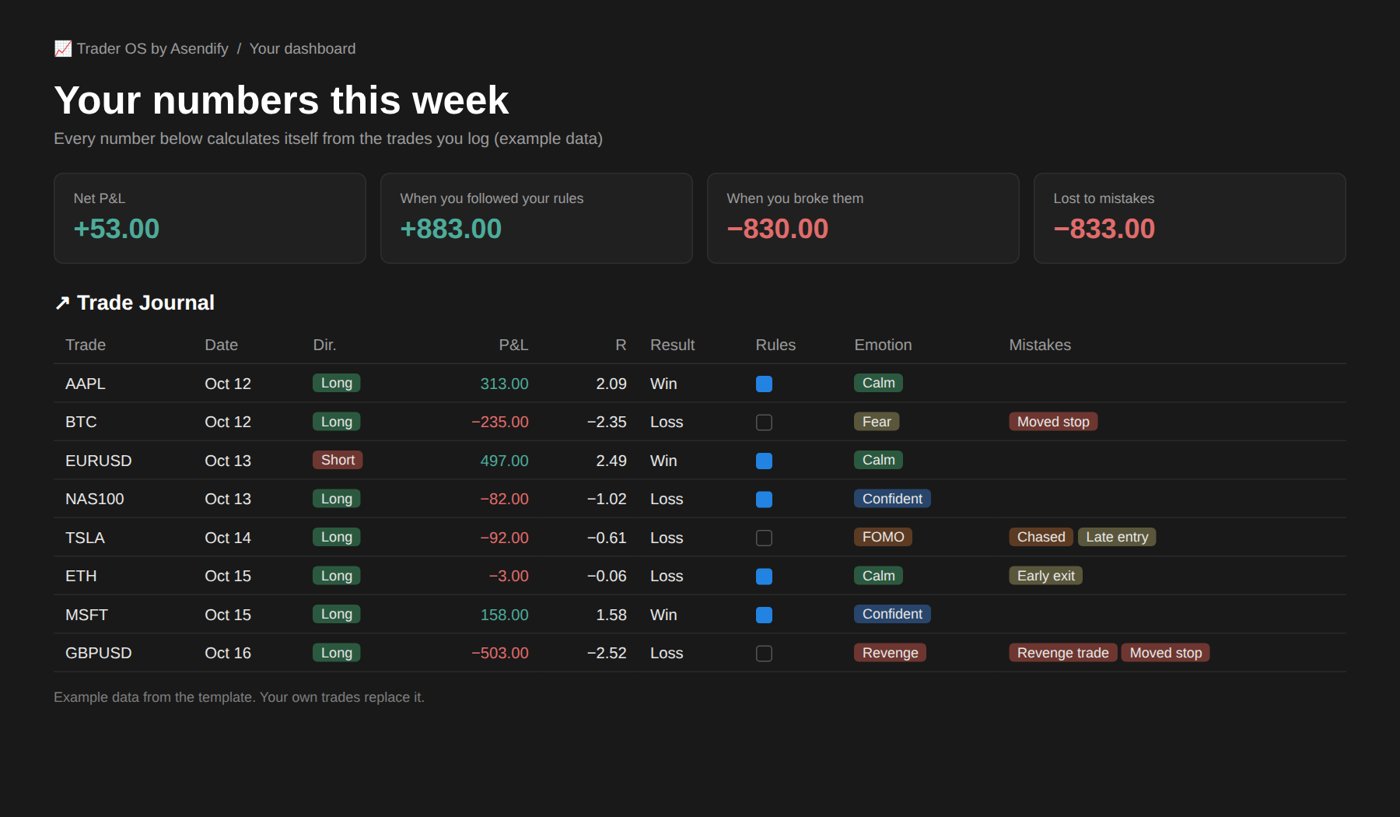
The dashboard with the example data. Everything calculates itself from the trades you log.
What's inside
Trade Journal
Entry, stop, target, exit, size and fees. P&L, risk, R-multiple, planned R:R and win/loss fill in by themselves. Tag your emotion and mistakes in two clicks.
Risk Calculator
Account size, risk %, entry and stop in; position size, max loss, reward-to-risk and a plain verdict out. Works for shares, crypto, forex and futures.
Strategy Playbook
One page per setup with entry, exit and invalidation rules and a pre-trade checklist. Win rate, average R and net P&L update from your trades.
Weekly Review
Net P&L, win rate, average R, money lost to mistakes, and P&L with rules kept vs broken, plus four questions and one rule for next week.
Watchlist
Write the level and the reason before price gets there, so you aren't deciding in the moment.
Example data
Eight example trades show every feature working. Delete them when you're ready and start logging your own.
How it helps you win more
1. Stop the leaks
Most traders find one or two habits cause most of their losses. Once you can see the number next to "moved stop" or "revenge trade", it's much easier to stop.
2. Trade what works
Keep the setups with a real edge in your own numbers and retire the ones without.
3. Never oversize
Size every position from the calculator so one bad trade can't wipe out a good week.
Questions
Does it work on the free Notion plan?
Yes. It uses databases, formulas, rollups and normal table views only, all of which work on free Notion. You need a Notion account (free) to duplicate it.
How do I get it?
Right after you pay, this page shows your link and we email it too. Open it, click Duplicate and choose your workspace. It takes about a minute.
What does it cost?
£150 one-time: £103.45 for the template + £46.55 service fee (45%). No subscription. In India: ₹20,999.
How does the Double Money-Back Guarantee work?
Use Trader OS to log your trades for your first month. If it doesn't show you at least one habit or setup that's costing you money, email montybhendkar@gmail.com within 35 days of buying, show us your journal, and we refund double what you paid. The guarantee is about what the journal shows you, not about trading profits.
Will it make me profitable?
No tool can promise that. Trader OS shows you, in your own numbers, which setups and habits make or lose you money, so you can do more of one and less of the other. It is not financial advice, and trading is risky.
Which markets does it support?
Stocks, forex, crypto, futures, options and indices. For futures and forex, enter your value per point (or lot size) and every number still works.
Want the strategy side too?
Our book Chart Edge covers technical analysis, trading strategies and risk management. Trader OS is the place to track how you apply it.